Documentation Index
Fetch the complete documentation index at: https://docs.opentaco.dev/llms.txt
Use this file to discover all available pages before exploring further.
This is a guide to setup OpenTaco Statesman with AWS Fargate and Microsoft Azure Authentication. The 3 files referenced are available in examples/aws-fargate-quickstart in the repo.
Prerequisites
- Terraform >= 1.6.0
- AWS CLI configured with credentials
- AWS Bucket
- Azure Account
Download the CLI
First you’ll want to download the CLI much like we do in the quickstart, this is not changed. We will have our server url later on though obviously, so don’t login yet.
Create Azure Native App
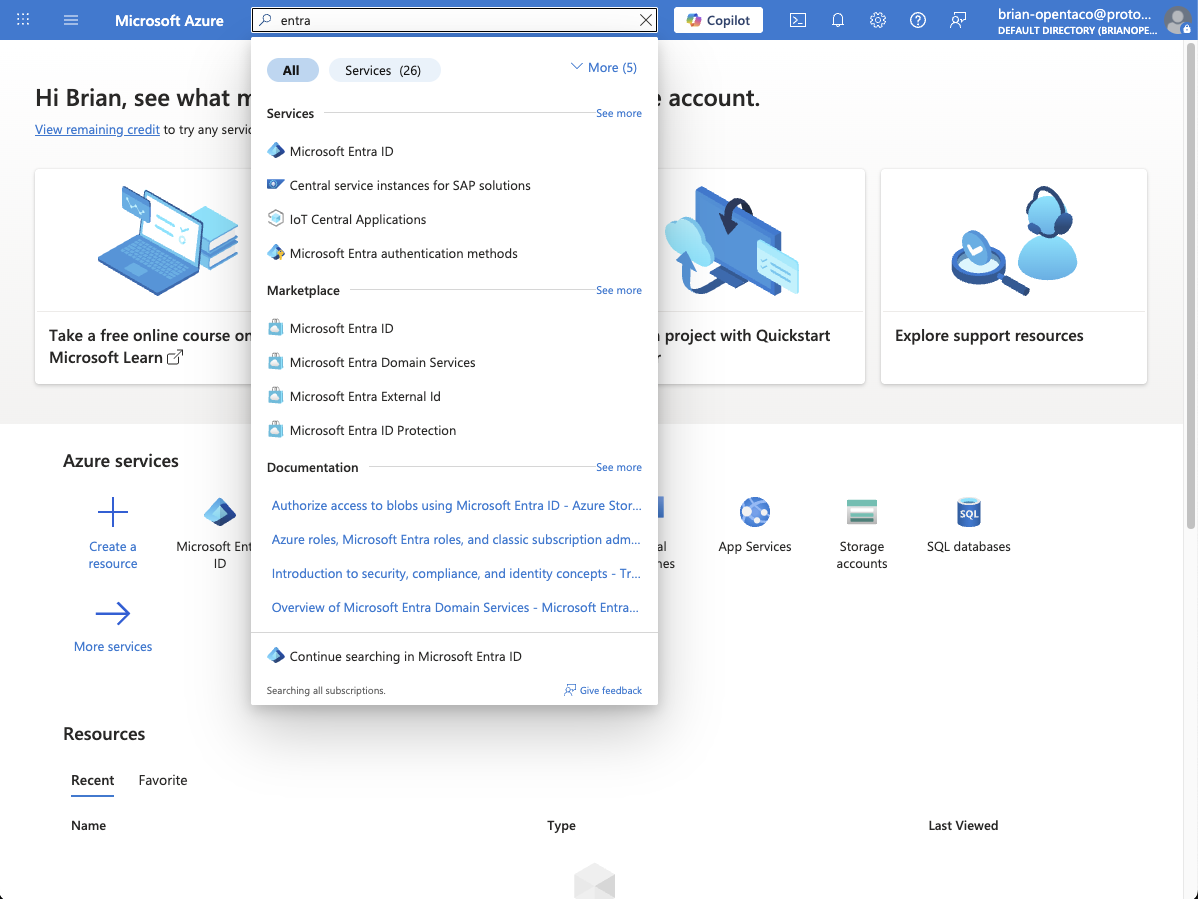
Then we’ll want to create a native app. Sign into azure, then navigate to Microsoft Entra ID.
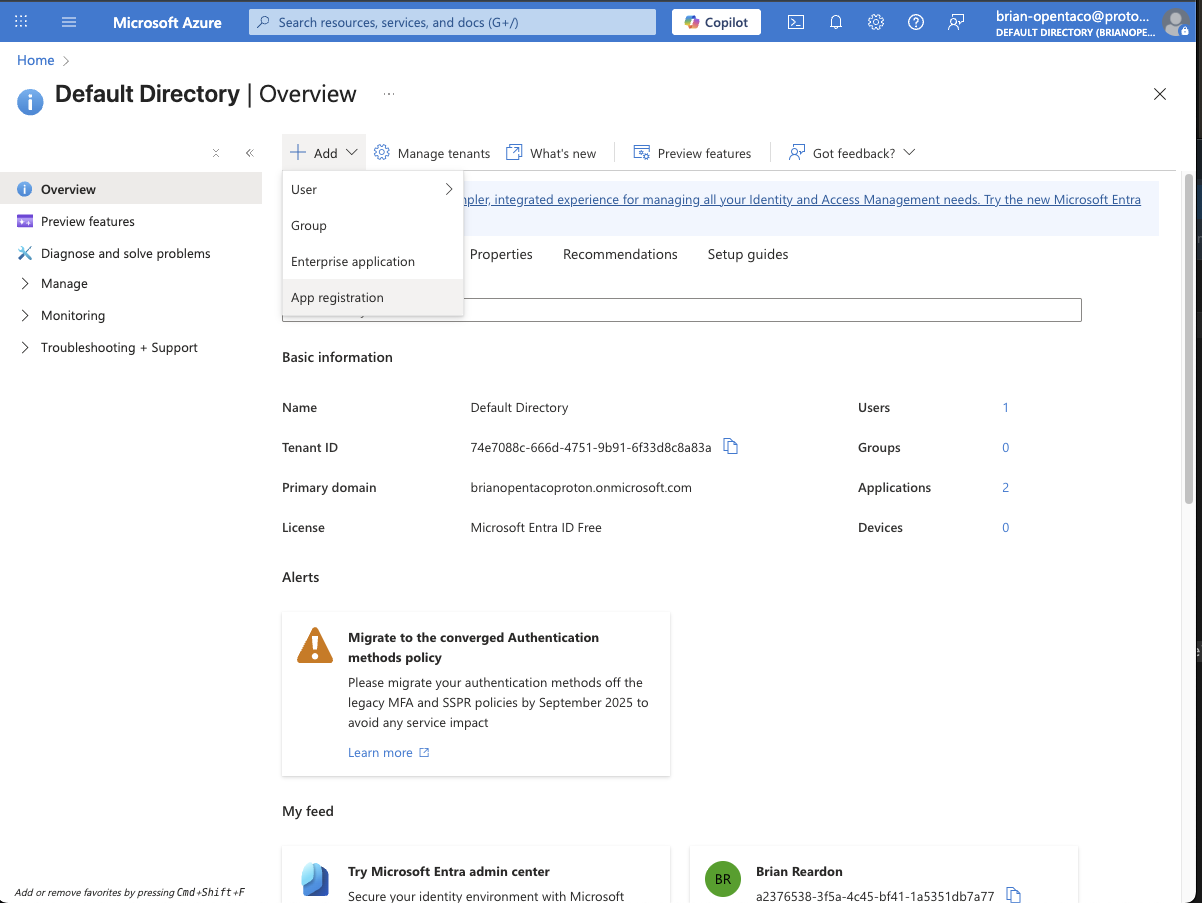
 Once you’ve signed in, go to add and select “App Registration”
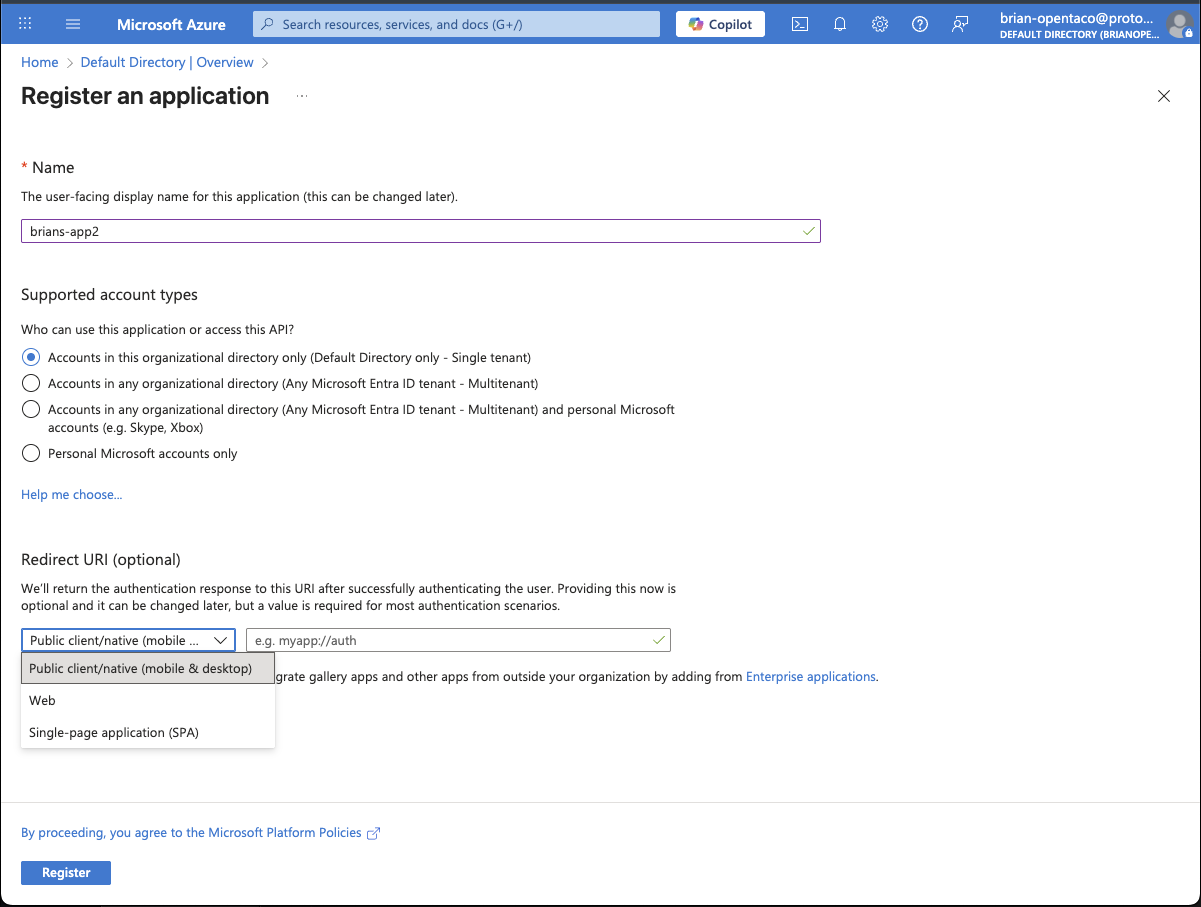
 From there you can name your app, select the platform as “Public client/native (mobile and desktop)” and for the redirect put “http://localhost:8585/callback”, we’ll need to add another oidc redirect later.
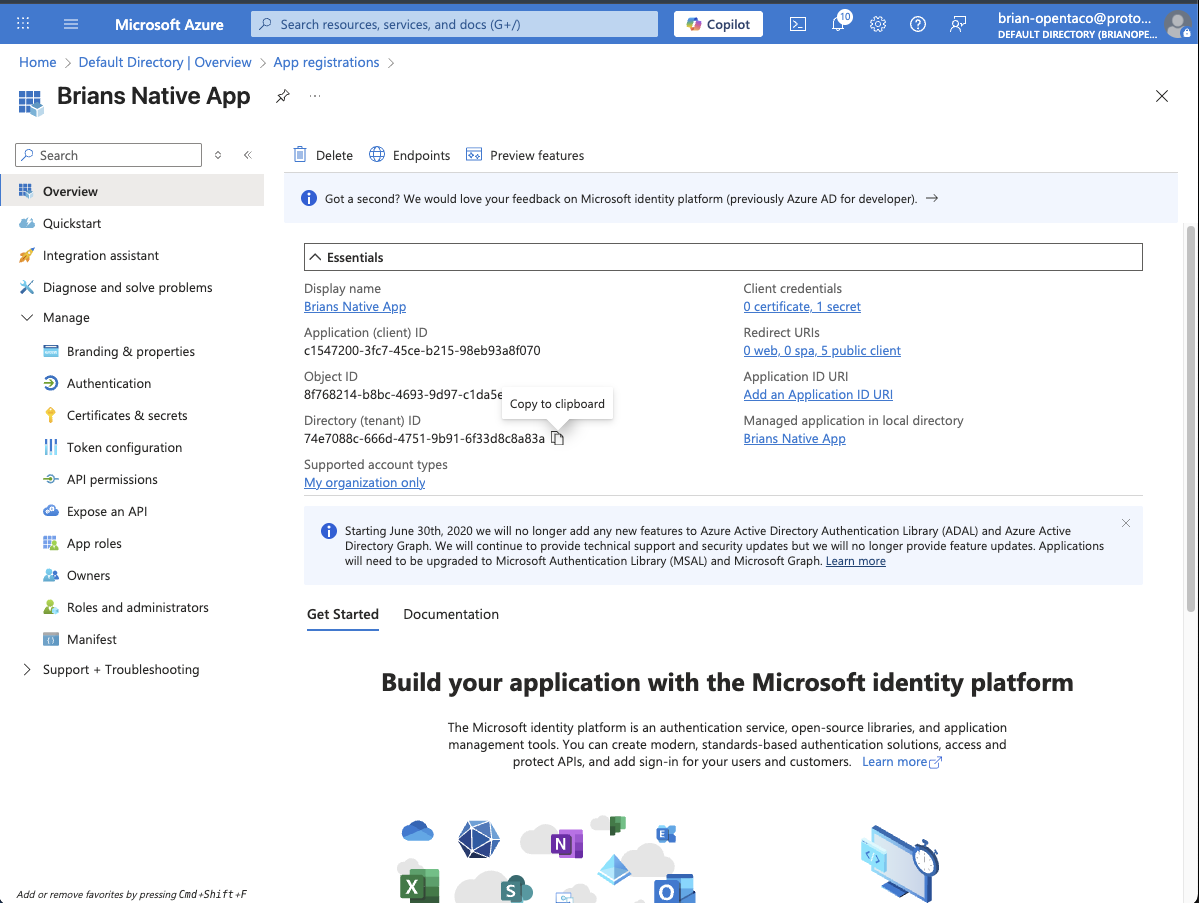
 Next, we’ll want to navigate to a new directory.
We’ll create three files: main.tf, variables.tf, and dev.tfvars
Lets start with our dev.tfvars:
Next, we’ll want to navigate to a new directory.
We’ll create three files: main.tf, variables.tf, and dev.tfvars
Lets start with our dev.tfvars:
region            = "us-west-2"
vpc_id            = "vpc-0123abcd"
public_subnet_ids = ["subnet-aaa", "subnet-bbb"]
container_image   = "ghcr.io/diggerhq/digger/taco-statesman:latest"

opentaco_s3_bucket   = "your-s3-bucket"
opentaco_s3_region   = "us-east-1"
opentaco_s3_prefix   = "your-prefix"


opentaco_auth_issuer    = "https://login.microsoftonline.com/your-tenant-id/v2.0" # no trailing slash!
opentaco_auth_client_id = "your-application-client-id"
opentaco_auth_auth_url  = "https://login.microsoftonline.com/your-tenant-id/oauth2/v2.0/authorize"
opentaco_auth_token_url =  "https://login.microsoftonline.com/your-tenant-id/oauth2/v2.0/token"
# Keep this out of git; set via TF_VAR_... or a secrets manager:
opentaco_auth_client_secret = "your-client-secret"

opentaco_port         = 8080
opentaco_storage      = "s3"
opentaco_auth_disable = "false"
opentaco_public_base_url = "https://your-cloudfront-instance.cloudfront.net"
Get AWS Resources
To get your vpc run:
VPC_ID=$(aws ec2 describe-vpcs \
  --filters Name=isDefault,Values=true \
  --query 'Vpcs[0].VpcId' --output text)
echo "$VPC_ID"
aws ec2 describe-subnets --filters Name=vpc-id,Values="$VPC_ID" \
  --query 'Subnets[].{id:SubnetId,az:AvailabilityZone,public:MapPublicIpOnLaunch}' \
  --output table
 Now the only thing we don’t have is our base url but we’ll get that later.
For now, lets add our main.tf:
Now the only thing we don’t have is our base url but we’ll get that later.
For now, lets add our main.tf:
#############################################
# main.tf — ECS (Fargate) + NLB + CloudFront
# Uses variables from variables.tf / *.tfvars
#############################################

terraform {
  required_version = ">= 1.6.0"
  required_providers {
    aws = { source = "hashicorp/aws", version = "~> 5.0" }
  }
}

provider "aws" {
  region = var.region
}

locals {
  name = var.name_prefix
}

############################
# Security (tasks SG)
############################
resource "aws_security_group" "tasks" {
  name   = "${local.name}-tasks-sg"
  vpc_id = var.vpc_id

  # Demo: open app port. Lock down in prod.
  ingress {
    protocol    = "tcp"
    from_port   = var.container_port
    to_port     = var.container_port
    cidr_blocks = ["0.0.0.0/0"]
  }

  egress {
    protocol    = "-1"
    from_port   = 0
    to_port     = 0
    cidr_blocks = ["0.0.0.0/0"]
  }

  tags = { Name = "${local.name}-tasks-sg" }
}

############################
# Network Load Balancer
############################
resource "aws_lb" "nlb" {
  name               = "${local.name}-nlb"
  load_balancer_type = "network"
  internal           = false
  subnets            = var.public_subnet_ids

  tags = { Name = "${local.name}-nlb" }
}

resource "aws_lb_target_group" "tg" {
  name        = "${local.name}-tg"
  port        = var.container_port
  protocol    = "TCP"
  vpc_id      = var.vpc_id
  target_type = "ip"

  health_check {
    protocol = "TCP"
    port     = "traffic-port"
  }

  tags = { Name = "${local.name}-tg" }
}

resource "aws_lb_listener" "tcp80" {
  load_balancer_arn = aws_lb.nlb.arn
  port              = 80
  protocol          = "TCP"

  default_action {
    type             = "forward"
    target_group_arn = aws_lb_target_group.tg.arn
  }
}

############################
# IAM (exec + task roles)
############################
data "aws_iam_policy_document" "task_assume" {
  statement {
    actions = ["sts:AssumeRole"]
    principals {
      type        = "Service"
      identifiers = ["ecs-tasks.amazonaws.com"]
    }
  }
}

# Execution role: ECR pulls, CloudWatch Logs, etc.
resource "aws_iam_role" "exec" {
  name               = "${local.name}-exec"
  assume_role_policy = data.aws_iam_policy_document.task_assume.json
}

resource "aws_iam_role_policy_attachment" "exec_logs" {
  role       = aws_iam_role.exec.name
  policy_arn = "arn:aws:iam::aws:policy/service-role/AmazonECSTaskExecutionRolePolicy"
}

# Add Secrets Manager access for the execution role
resource "aws_iam_role_policy_attachment" "exec_secrets" {
  role       = aws_iam_role.exec.name
  policy_arn = "arn:aws:iam::aws:policy/SecretsManagerReadWrite"
}

# Task role: grant app S3 access (bucket + prefix)
resource "aws_iam_role" "task" {
  name               = "${local.name}-task"
  assume_role_policy = data.aws_iam_policy_document.task_assume.json
}

data "aws_iam_policy_document" "s3_policy" {
  statement {
    actions   = ["s3:ListBucket"]
    resources = ["arn:aws:s3:::${var.opentaco_s3_bucket}"]
    condition {
      test     = "StringLike"
      variable = "s3:prefix"
      values   = ["${var.opentaco_s3_prefix}/*"]
    }
  }
  statement {
    actions   = ["s3:GetObject","s3:PutObject","s3:DeleteObject"]
    resources = ["arn:aws:s3:::${var.opentaco_s3_bucket}/${var.opentaco_s3_prefix}/*"]
  }
}

resource "aws_iam_policy" "s3_policy" {
  name   = "${local.name}-s3"
  policy = data.aws_iam_policy_document.s3_policy.json
}

resource "aws_iam_role_policy_attachment" "task_s3" {
  role       = aws_iam_role.task.name
  policy_arn = aws_iam_policy.s3_policy.arn
}

############################
# Logs + Secrets
############################
resource "aws_cloudwatch_log_group" "lg" {
  name              = "/ecs/${local.name}"
  retention_in_days = 7
}

resource "aws_secretsmanager_secret" "auth0_client_secret" {
  name = "${local.name}/auth0_client_secret_v2"
}

resource "aws_secretsmanager_secret_version" "auth0_client_secret_v" {
  secret_id     = aws_secretsmanager_secret.auth0_client_secret.id
  secret_string = var.opentaco_auth_client_secret
}

############################
# ECS Cluster / Task / Service
############################
resource "aws_ecs_cluster" "cluster" {
  name = "${local.name}-cluster"
}

resource "aws_ecs_task_definition" "taskdef" {
  family                   = "${local.name}-task"
  requires_compatibilities = ["FARGATE"]
  network_mode             = "awsvpc"
  cpu                      = "512"   # 0.5 vCPU
  memory                   = "1024"  # 1 GB
  execution_role_arn       = aws_iam_role.exec.arn
  task_role_arn            = aws_iam_role.task.arn

  container_definitions = jsonencode([
    {
      name        = "web"
      image       = var.container_image
      essential   = true
      portMappings = [{ containerPort = var.container_port, protocol = "tcp" }]

      environment = [
        { name = "OPENTACO_S3_BUCKET",  value = var.opentaco_s3_bucket },
        { name = "OPENTACO_S3_REGION",  value = var.opentaco_s3_region },
        { name = "OPENTACO_S3_PREFIX",  value = var.opentaco_s3_prefix },

        { name = "OPENTACO_AUTH_ISSUER",    value = var.opentaco_auth_issuer },
        { name = "OPENTACO_AUTH_CLIENT_ID", value = var.opentaco_auth_client_id },
        { name = "OPENTACO_AUTH_AUTH_URL",  value = var.opentaco_auth_auth_url },
        { name = "OPENTACO_AUTH_TOKEN_URL", value = var.opentaco_auth_token_url },

        { name = "OPENTACO_PORT",         value = tostring(var.opentaco_port) },
        { name = "OPENTACO_STORAGE",      value = var.opentaco_storage },
        { name = "OPENTACO_AUTH_DISABLE", value = var.opentaco_auth_disable },
        { name = "OPENTACO_PUBLIC_BASE_URL", value = var.opentaco_public_base_url }
      ]

      secrets = [
        { name = "OPENTACO_AUTH_CLIENT_SECRET", valueFrom = aws_secretsmanager_secret.auth0_client_secret.arn }
      ]

      logConfiguration = {
        logDriver = "awslogs",
        options = {
          awslogs-group         = aws_cloudwatch_log_group.lg.name,
          awslogs-region        = var.region,
          awslogs-stream-prefix = "ecs"
        }
      }
    }
  ])
}

resource "aws_ecs_service" "svc" {
  name            = "${local.name}-svc"
  cluster         = aws_ecs_cluster.cluster.id
  task_definition = aws_ecs_task_definition.taskdef.arn
  desired_count   = 1
  launch_type     = "FARGATE"
  platform_version = "LATEST"

  load_balancer {
    target_group_arn = aws_lb_target_group.tg.arn
    container_name   = "web"
    container_port   = var.container_port
  }

  network_configuration {
    subnets          = var.public_subnet_ids   # public subnets → no NAT required
    security_groups  = [aws_security_group.tasks.id]
    assign_public_ip = true
  }

  depends_on = [aws_lb_listener.tcp80]
}

############################
# CloudFront (free *.cloudfront.net HTTPS)
############################
resource "aws_cloudfront_distribution" "edge" {
  enabled     = true
  comment     = "${local.name} via CloudFront"
  price_class = "PriceClass_100"  # US/EU

  origin {
    domain_name = aws_lb.nlb.dns_name
    origin_id   = "nlb-origin"

    # NLB is a public HTTP origin for this demo
    custom_origin_config {
      http_port              = 80
      https_port             = 443
      origin_protocol_policy = "http-only"
      origin_ssl_protocols   = ["TLSv1.2"]
    }
  }

  default_cache_behavior {
    target_origin_id       = "nlb-origin"
    viewer_protocol_policy = "redirect-to-https"

    allowed_methods = ["GET","HEAD","OPTIONS","PUT","POST","PATCH","DELETE"]
    cached_methods  = ["GET","HEAD"]
    compress        = true

    # forward everything; disable caching for dynamic/API
    forwarded_values {
      query_string = true
      headers      = ["*"]
      cookies { forward = "all" }
    }
    min_ttl     = 0
    default_ttl = 0
    max_ttl     = 0
  }

  restrictions {
    geo_restriction {
      restriction_type = "none"
    }
  }

  viewer_certificate {
    cloudfront_default_certificate = true
  }

  depends_on = [aws_lb_listener.tcp80]
}

############################
# Outputs
############################
output "cloudfront_domain" {
  description = "Public HTTPS domain for your app"
  value       = aws_cloudfront_distribution.edge.domain_name
}

output "nlb_dns_name" {
  description = "NLB DNS (HTTP origin behind CloudFront)"
  value       = aws_lb.nlb.dns_name
}

output "ecs_cluster" { value = aws_ecs_cluster.cluster.name }
output "ecs_service" { value = aws_ecs_service.svc.name }
variable "region"            { type = string }
variable "name_prefix" {
  type    = string
  default = "statesman"
}

variable "vpc_id"            { type = string }
variable "public_subnet_ids" { type = list(string) }

variable "container_image"   { type = string }
variable "container_port" {
  type    = number
  default = 8080
}

# App config (non-secrets)
variable "opentaco_s3_bucket"  { type = string }
variable "opentaco_s3_region"  { type = string }
variable "opentaco_s3_prefix"  { type = string }

variable "opentaco_auth_issuer"    { type = string }
variable "opentaco_auth_client_id" { type = string }
variable "opentaco_auth_auth_url"  { type = string }
variable "opentaco_auth_token_url" { type = string }

variable "opentaco_port"         { type = number }
variable "opentaco_storage"      { type = string }
# Keep as string if your app expects "true"/"false"
variable "opentaco_auth_disable" { type = string }

variable "opentaco_public_base_url" { type = string }

# Secret
variable "opentaco_auth_client_secret" {
  type      = string
  sensitive = true
}
Deploy Infrastructure
Now from the root of this directory we can run the first apply, after this we’ll get the cloudfront domain and we can log in:
terraform apply -var-file=dev.tfvars -auto-approve
terraform output -raw cloudfront_domain
Update Configuration
Now we have to add this with https:// to our tfvars file as our OPENTACO_PUBLIC_BASE_URL, if you’ve been following along it should be the only value missing.
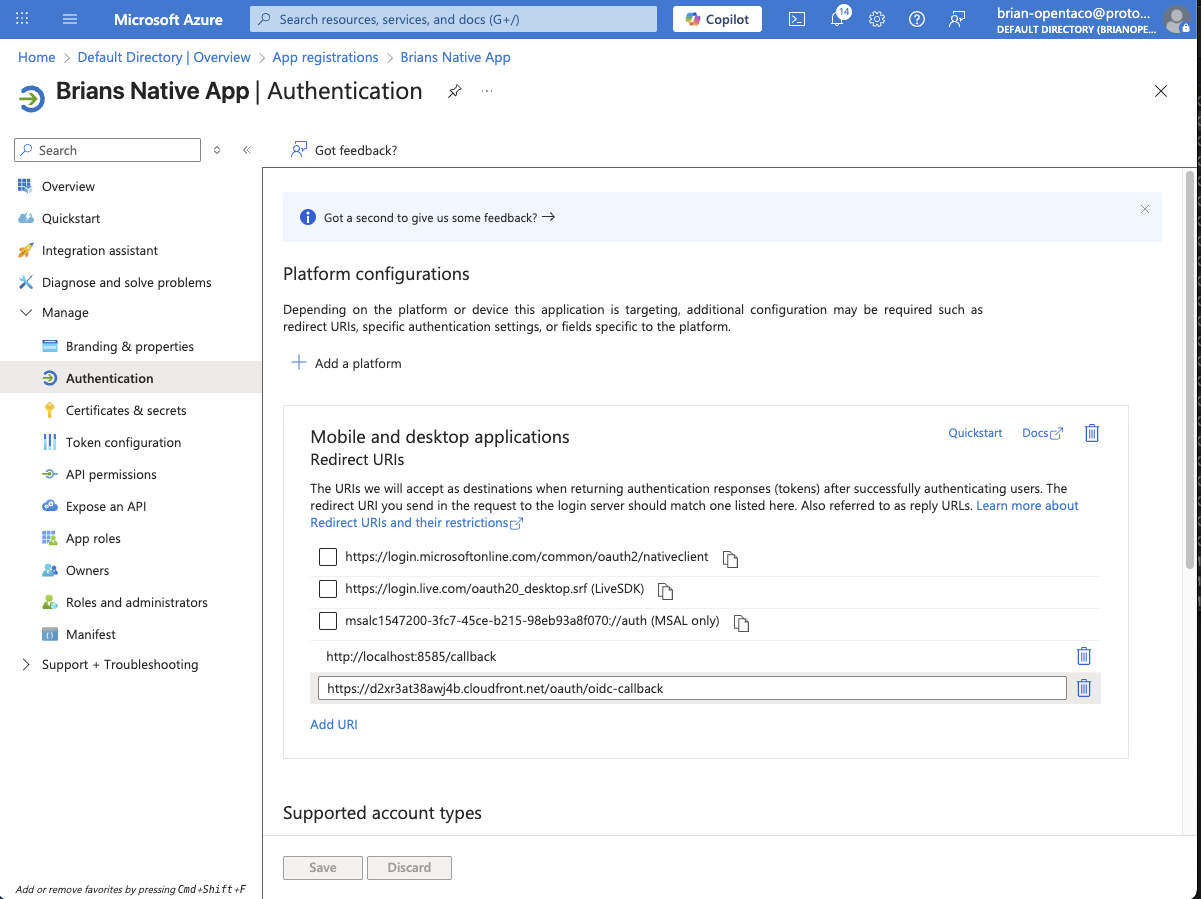
We also need to add https://your-instance.cloudfront.net/oauth/oidc-callback to our redirect URIs in Azure, this can be found under “Manage” -> “Authentication”
Your result should look like this:
 With those two set we can apply again:
terraform apply -var-file=dev.tfvars -auto-approve
echo "https://$(terraform output -raw cloudfront_domain)/readyz"
Login
Now with our service ready, we can run taco login and set our server to be the same value as our OPENTACO_PUBLIC_BASE_URL. For reference I used https://d2xr3at38awj4b.cloudfront.net/
